
Cloudmore is a Commerce Control Plane that enables the resale and management of cloud services through a multi-tier distribution model.
The platform provides end-to-end subscription lifecycle management, billing automation, and white-label self-service capabilities.
Core Value Proposition:
-
Unified commercial architecture across multiple vendors and cloud services
-
Automated subscription lifecycle management (provisioning, upgrades, renewals, cancellation)
-
Multi-model monetization (subscription, usage, consumption, hybrid)
-
White-label self-service portal for end customers
-
API-first architecture for system integration
Role Hierarchy
The platform operates on a three-tier distribution model:
-
Seller (aka service owner or vendor, like Microsoft or Adobe) publishes services to Marketplace.
-
Broker (aka reseller or distributor) makes services available via E-Store.
-
Organization (company consuming services) purchases subscriptions from the E-Store via self-service.
Entity Relationships
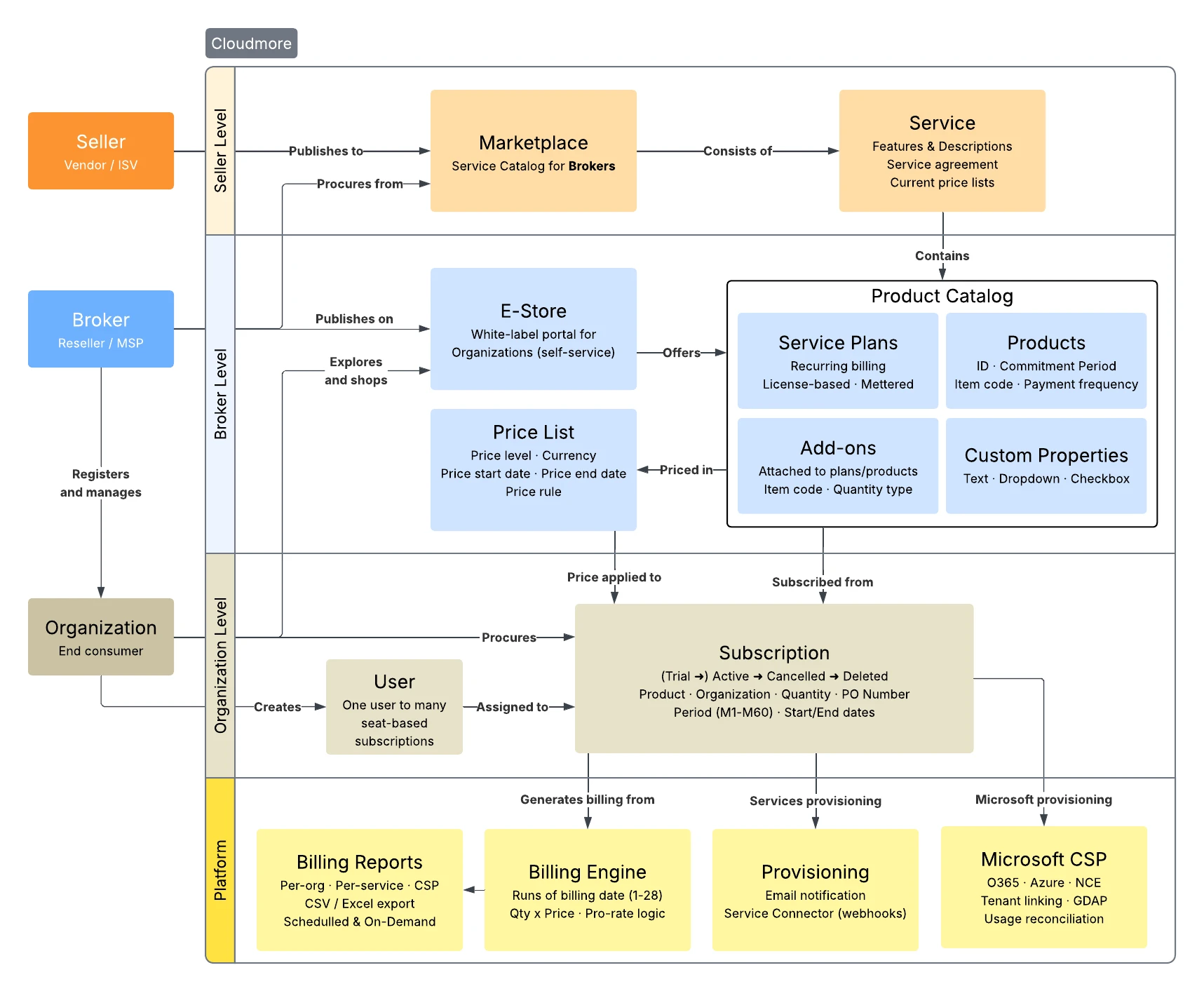
|
Entity |
Description |
Key Actions |
|---|---|---|
|
Seller |
Original service owner/vendor |
Creates services, publishes to Marketplace, sets cost prices |
|
Broker |
Reseller/distributor |
Adds services from Marketplace, sets sales prices, manages organizations |
|
Organization |
End consumer |
Adds services from E-Store, creates subscriptions, manages users |
Key Terminology
|
Term |
Definition |
|---|---|
|
Commerce Control Plane |
Official name of the platform. |
|
CSP |
Cloud Solution Provider (Microsoft partner program) |
|
NCE |
New Commerce Experience (Microsoft's updated commerce platform) |
|
Tenant |
Microsoft-specific term for an organization |
|
Custom Service |
Any non-Microsoft service (seller-created) |
|
Host Admin |
Cloudmore internal super-admin layer |
|
ISV |
Independent Software Vendors are service owners who create digital services and publish them to Cloudmore's Marketplace |
|
ERP |
Enterprise Resource Planning is an external financial system where Brokers export Cloudmore's billing data via API or Excel for invoice generation, payment processing, and financial reporting |
Core Concepts
Services
A Service represents a cloud offering made available through the platform. Services contain metadata and configuration:
-
Billing date (1-28 of month)
-
Provisioning type (Email or REST API)
-
User assignment (Y/N)
-
License keys (Y/N)
-
Custom properties
-
Marketing information
Service Categories:
|
Type |
Description |
Examples |
|---|---|---|
|
Custom Services |
Third-party integrations |
Dropbox, Kaspersky, WatchGuard. A custom service can be added by a broker manually, without direct integration to a seller. |
|
Microsoft CSP |
Microsoft Cloud Solution Provider services |
Office 365, Azure |
Marketplace vs E-Store
|
Concept |
Audience |
Purpose |
|---|---|---|
|
Marketplace |
Brokers |
Catalog of services available for the broker to add |
|
E-Store |
Organizations |
Catalog of services the broker has made available |
Both function as service catalogs (analogous to App Store/Play Store) but are scoped to different role levels.
Product Types
Products exist within Services and define the purchasable SKUs. The platform supports two primary billing categories:
One-Time Billing (Products)
-
Single payment at purchase
-
Used for hardware or perpetual licenses
-
~5% of platform subscriptions
Recurring Billing (Service Plans)
~95% of subscriptions fall into this category, subdivided into:
1. License-Based (Product-Based) Plans
Billing model: Pay upfront for a defined quantity
Subscription Created → Quantity Selected → Immediate Billing
                       (e.g., 10 seats)    (quantity × price)
-
User defines quantity at subscription creation
-
Billed for the upcoming period
-
Example: 10 Dropbox licenses × €15/month = €150
2. Consumption-Based (Metered) Plans
Billing model: Pay retroactively based on actual usage
Subscription Created → Usage Period → Consumption Submitted → Billing Generated
                       (1 month)      (at period end)         (usage × price)
-
No payment at subscription creation
-
Consumption reported at end of billing cycle
-
Billed in arrears for actual usage
-
Example: 9.5 GB used × €10/GB = €95
Key API for Metered Billing:
POST /api/consumption  # Submit consumption data
GET  /api/consumption/{taskId}  # Check submission status
Billing Logic Options
|
Setting |
Behavior |
|---|---|
|
Billing Day Only |
Generate billing only on service billing date for full cycle |
|
Pro-rate Billing |
Proportional billing for mid-period changes |
|
First Partial Cycle |
Configurable handling of initial incomplete period |
Subscriptions
Subscriptions are created from Products and represent active service consumption.
Subscription Lifecycle
Created → (Trial →) Active → Cancelled → Deleted
                       ↑         │
                       └ Renewed ┘
|
State |
Description |
|---|---|
|
Trial |
Optional trial period (pushes start date forward). Seller sets trial duration, auto-conversion to paid, and product change allowed. |
|
Active |
Generating billing, service accessible |
|
Cancelled |
Marked for non-renewal, still usable until deletion |
|
Deleted |
No billing, access revoked |
Subscription Configuration
Products define subscription behavior through settings:
-
Subscription period
-
Payment frequency (billing interval)
-
Minimum/Maximum quantity
-
Cancellation policy
-
Renewal policy
-
Auto-renew (Y/N)
Add-ons
Optional extras attached to subscriptions with independent pricing:
-
Pricing models: Subscription, Quantity, Selected (one-time), Metered
-
Grouping: Add-ons can be organized into logical groups
-
Configured by Seller, optional for Organization
Read more about subscription management
Service Agreements
Cloudmore supports agreement acceptance workflows that gate access to services. Three agreement types exist:
|
Agreement Type |
Configured By |
Triggered When |
Blocks |
|---|---|---|---|
|
Custom Service |
Seller |
Adding service from E-Store |
Service subscription |
|
MCA |
Organization in E-Store or Broker accepts on behalf of the organization |
First Microsoft CSP purchase |
Microsoft subscriptions |
|
Broker-Level |
Broker |
User login |
Platform access (after 30 days) |
Pricing Architecture
Price Flow
Seller Cost Price → Broker Cost → Broker Sales Price → Organization
                                  (set in Price List)
|
Price Type |
Set By |
Description |
|---|---|---|
|
Cost Price |
Seller |
What the seller charges the broker |
|
Recommended Price |
Seller |
Suggested end-customer price |
|
Sales Price |
Broker |
What the broker charges the organization |
Price List
Brokers maintain a Price List to control margins:
Seller cost: €10
Broker sales price: €15
Gross profit: €15 − €10 = €5
Markup on cost: €5 ÷ €10 × 100 = 50%
Gross margin on sales: €5 ÷ €15 × 100 = 33.3%
Price determination hierarchy:
-
Subscription-specific price (if set)
-
Organization-specific price (if set)
-
Global price list entry
-
Seller recommended price (fallback)
Read more about price management
Multi-Currency Support
-
Organizations can operate in different currencies
-
Billing reports aggregate across currencies
-
Currency exchange service available for reporting
-
ISO 4217 currency codes required
Read more about currency support
Billing System
Billing Generation
The billing job runs on configured billing dates (1-28 of month):
Billing Job → For each active subscription:
              1. Check quantity (license-based) or consumption (metered)
              2. Look up price from Price List
              3. Calculate: quantity × price
              4. Generate billing line
Billing Reports
Available at all role levels (Seller, Broker, Organization):
|
Report Type |
Content |
|---|---|
|
Total Billing Report |
All services, all organizations, date range filter |
|
Monthly Billing Per Organization |
Per-org breakdown by service/subscription/product |
|
Azure Billing |
Microsoft Azure-specific with margin support |
|
NCE Billing |
New Commerce Experience Microsoft subscriptions |
Export formats: UI display, Excel (.xlsx), API (JSON)
Read more about billing and reconciliation
Additional Charges
Manual billing line insertion for adjustments outside regular billing cycles:
{
  "billingDate": "2025-06-17T00:00:00Z",
  "serviceId": "uuid",
  "subscriptionId": "string",
  "quantity": 1.0,
  "costPrice": 10.00,
  "salesPrice": 15.00,
  "currencyCode": "EUR",
  "note": "One-time adjustment"
}
Read more about manual billing lines
Billing Scope
What Cloudmore handles:
-
Billing data generation
-
Subscription management
-
Pricing and price lists
-
Consumption tracking
What Cloudmore does NOT handle:
-
Payment processing
-
Invoice generation
-
Payment collection
Brokers export billing data via API/Excel and integrate with their ERP/financial systems for invoicing.
White-Label & Branding
Customization Options
Brokers can fully white-label the platform:
|
Element |
Customization |
|---|---|
|
Logo |
280×54 pixels (expanded menu) |
|
Icon |
54×54 pixels (collapsed menu) |
|
Colors |
Theme colors throughout UI |
|
Banner |
Header banner image |
|
Login Page |
Custom background, logo |
|
Domain |
Custom URL (e.g., |
|
Start Page |
Custom HTML content |
|
Email Domain |
Send from broker's domain |
Self-Service Portal
Organizations access a white-labeled portal to:
-
Create/manage subscriptions
-
Assign subscriptions to users
-
View billing information
-
Manage user accounts
This reduces broker support overhead by enabling customer self-service.
Read more about branding and white labelling
User Management
Cloudmore uses role-based access control (RBAC) across three tiers. Each tier has distinct roles with granular permissions.
Full permissions matrix: See https://docs.google.com/spreadsheets/d/1H7rpuLsOlCp1oou-zQkPeYDuGkZL25LUE3ViGnppz90/edit?gid=0#gid=0 for detailed page-level access.
Read more about user management
Authentication Methods
-
Username/Password - Standard Cloudmore credentials
-
Microsoft SSO - Azure AD integration
-
SAML SSO - Enterprise identity providers
Microsoft Integration
Microsoft CSP (Cloud Solution Provider)
Two primary Microsoft services with custom integrations:
|
Service |
Description |
|---|---|
|
Microsoft 365 CSP Direct |
Office 365, Enterprise solutions |
|
Microsoft Azure |
Virtual machines, cloud storage, infrastructure |
Microsoft Azure exists in two distinct billing models on the platform: Azure Plan and Azure Legacy (deprecated - no new subscriptions can be created). These are architecturally separate with different pricing, margin calculation, and API behavior.
Tenant Linking
Microsoft customers (tenants) must be linked to Cloudmore organizations:
Microsoft Partner Center ←→ Cloudmore Organization
      (Tenant ID)             (Organization ID)
Linking methods:
-
Automatic: Organization adds Microsoft service from E-Store → Tenant created and linked
-
Manual: Broker links existing tenant to existing organization
-
Bulk: "Auto create and link" all tenants at once
Critical: Unlinked tenants do not appear in billing reports.
Read more about Microsoft tenant linking
Microsoft Authentication
Brokers must configure MFA token for Partner Center API integration:
My Services → Microsoft 365 CSP Direct → Microsoft CSP Authentication
Prerequisites:
-
Privileged Role Administrator account with MFA enabled
-
Admin Agent role in Partner Center
-
Token auto-refreshes nightly
Read more about Microsoft authentication
API Reference
URL Structure
Seller level:
https://api.cloudmore.com/api/sellers/{sellerId}
Broker level:
https://api.cloudmore.com/api/resellers/{resellerId}
Full documentation: https://api.cloudmore.com/swagger/
Common API Identifiers & Endpoints
|
Entity |
ID Format |
Example |
|---|---|---|
|
Organization |
UUID |
|
|
Service |
UUID |
|
|
Subscription |
UUID |
|
|
Product |
UUID |
|
|
User |
UUID |
|
|
Customer Number |
String |
|
|
Item Code |
String |
|
Organization Management:
GET    /api/resellers/{resellerId}/organizations
POST   /api/resellers/{resellerId}/organizations
PUT    /api/resellers/{resellerId}/organizations/{organizationId}
DELETE /api/resellers/{resellerId}/organizations/{organizationId}
Read more about Organization Management APIs
Subscription Management:
GET    /api/resellers/{resellerId}/organizations/{orgId}/services/{serviceId}/subscriptions
POST   /api/resellers/{resellerId}/organizations/{orgId}/services/{serviceId}/subscriptions
PUT    /api/resellers/{resellerId}/organizations/{orgId}/services/{serviceId}/subscriptions/{subId}
DELETE /api/resellers/{resellerId}/organizations/{orgId}/services/{serviceId}/subscriptions/{subId}
Read more about Subscription Management APIs
Billing Data:
GET /api/resellers/{resellerId}/billing/monthly
GET /api/resellers/{resellerId}/billing/organizations/{orgId}
Consumption Submission (Metered):
POST /api/consumption/bulk  # Returns taskId
GET  /api/consumption/{taskId}  # Check status
Read more about Consumption APIs
Service Integrations
Provisioning Types
When services are added or subscriptions created, Cloudmore can trigger external provisioning:
|
Type |
Mechanism |
|---|---|
|
|
Notification sent to configured address |
|
Service Connector |
Webhook call to predefined endpoint |
Service Connector
For REST provisioning, a Cloudmore Service Connector acts as middleware:
Cloudmore → Service Connector → External Service
            (webhook)           (API translation)
Read more about service integrations
Provisioning Log
All provisioning events are logged under Logs → Provisioning Log with:
-
Event type (create, update, cancel)
-
Timestamp
-
Status (pending, done)
-
Manual completion option